
Bilgi Merkezi
39. How can I submit a support ticket?
To get assistance, here's how you can quickly open a support ticket from your dashboard.
- Log in to your dashboard.
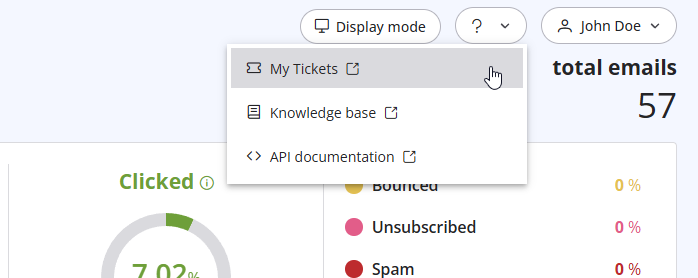
- Click the question mark (?) icon at the top of the pageand select "My Tickets" from the dropdown menu.
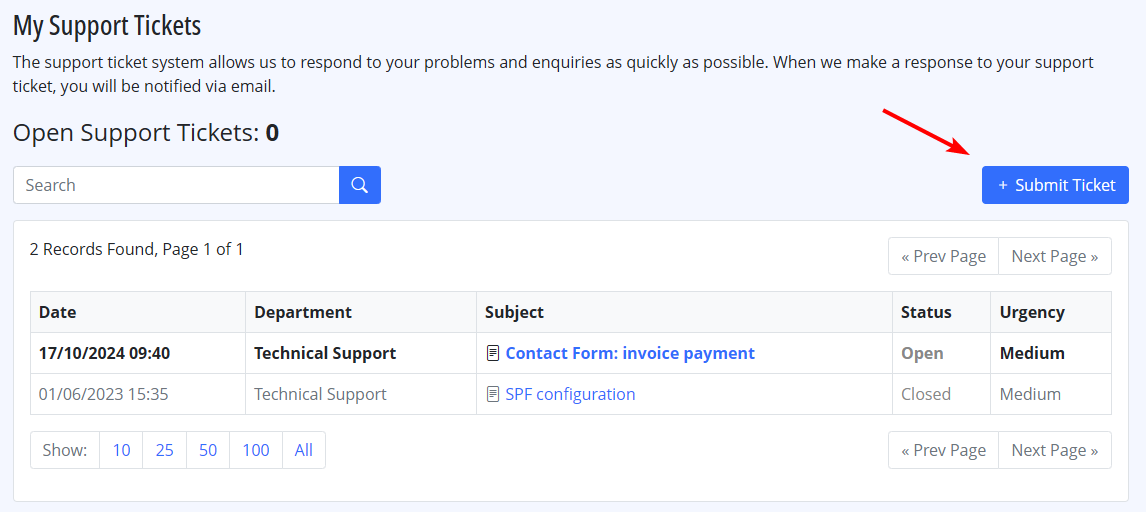
- Click on "Submit a Ticket" to create a new support request.
Also Read
32. Yahoo emails in queue with high complain rate error
(Görüntülenme: 759643)
32. Yahoo emails in queue with high complain rate error (Görüntülenme: 759643)
29. Gönderen alanı doğrulanmamışsa ne olur? (Yeniden Zarflanmış Gönderen)
(Görüntülenme: 1498842)
29. Gönderen alanı doğrulanmamışsa ne olur? (Yeniden Zarflanmış Gönderen) (Görüntülenme: 1498842)
35. My ISP blocks outgoing mail on port 25. What can I do?
(Görüntülenme: 25825226)
35. My ISP blocks outgoing mail on port 25. What can I do? (Görüntülenme: 25825226)
41. Privacy Policy
(Görüntülenme: 1564047)
41. Privacy Policy (Görüntülenme: 1564047)
23. What is a "dropped" email?
(Görüntülenme: 1152716)
23. What is a "dropped" email? (Görüntülenme: 1152716)
|
|

