
база знания
13. I want to change my plan. Can I do it?
You can order a new plan by following the steps below:
1. Log in to your dashboard.
2. Click on your name in the top right corner of the screen and select "My Products" from the dropdown menu.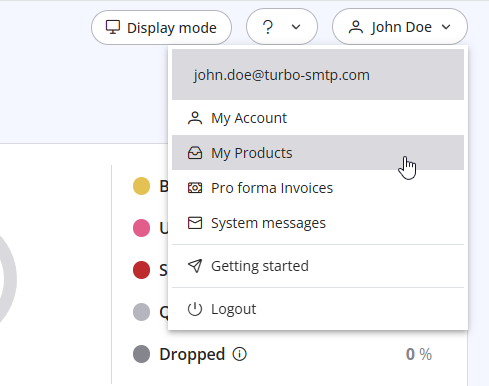
3. Click "Order New Plan" to proceed. 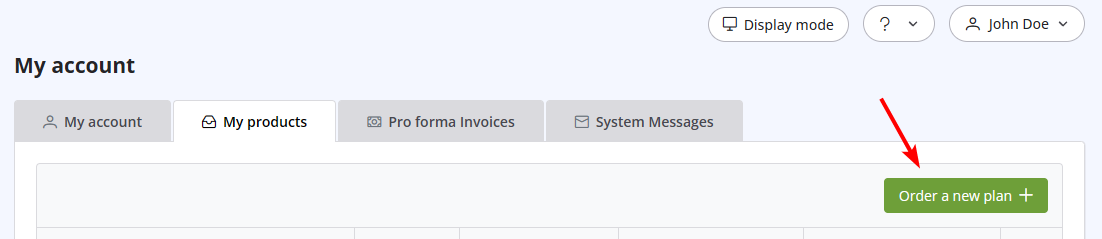
Също Прочетено
22. Why my emails are going to the spam folder?
(Прегледи: 1451790)
22. Why my emails are going to the spam folder? (Прегледи: 1451790)
18. What types of payment do you accept?
(Прегледи: 24821183)
18. What types of payment do you accept? (Прегледи: 24821183)
5. Do I need a Credit Card to activate a Free Trial?
(Прегледи: 1002203)
5. Do I need a Credit Card to activate a Free Trial? (Прегледи: 1002203)
24. How can I ask the permission to send a newsletter?
(Прегледи: 1008388)
24. How can I ask the permission to send a newsletter? (Прегледи: 1008388)
27. I cannot configure the DNS of my domain. How can I do?
(Прегледи: 977450)
27. I cannot configure the DNS of my domain. How can I do? (Прегледи: 977450)
|
|

