
база знания
31. How can I get notified of my bounce?
Want to keep a close eye on your bounce notifications? You can easily choose how to receive them directly in your inbox or let turboSMTP manage them for you.
Here’s how to set your preferences.
- Log in to your dashboard.
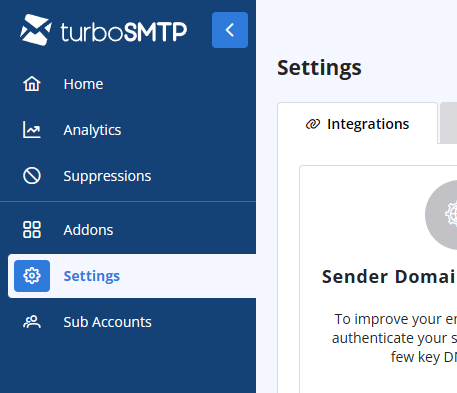
- Click on the Settings tab on the left-hand menu.
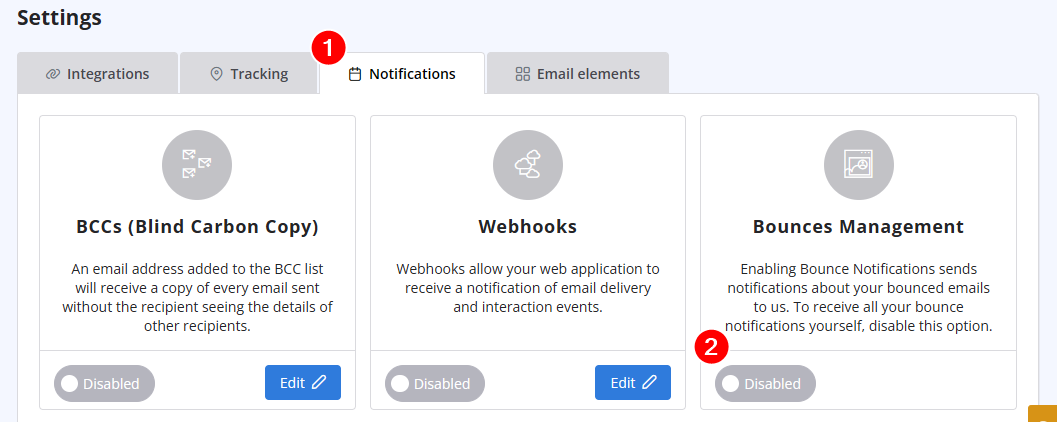
- Select Notifications from the options. and disable "Bounces management" if you prefer to receive all bounce notifications directly.
Също Прочетено
32. Yahoo emails in queue with high complain rate error
(Прегледи: 725419)
32. Yahoo emails in queue with high complain rate error (Прегледи: 725419)
36. Why is turboSMTP still using the free emails even if I bought a paid plan?
(Прегледи: 1036636)
36. Why is turboSMTP still using the free emails even if I bought a paid plan? (Прегледи: 1036636)
5. Do I need a Credit Card to activate a Free Trial?
(Прегледи: 1024346)
5. Do I need a Credit Card to activate a Free Trial? (Прегледи: 1024346)
37. I just purchased a monthly plan/prepaid but I can't send emails. Why?
(Прегледи: 2254664)
37. I just purchased a monthly plan/prepaid but I can't send emails. Why? (Прегледи: 2254664)
10. Is the email address with which I signed up the only one that I can use as a sender? (Прегледи: 986135)
|
|

