
Bilgi Merkezi
13. I want to change my plan. Can I do it?
You can order a new plan by following the steps below:
1. Log in to your dashboard.
2. Click on your name in the top right corner of the screen and select "My Products" from the dropdown menu.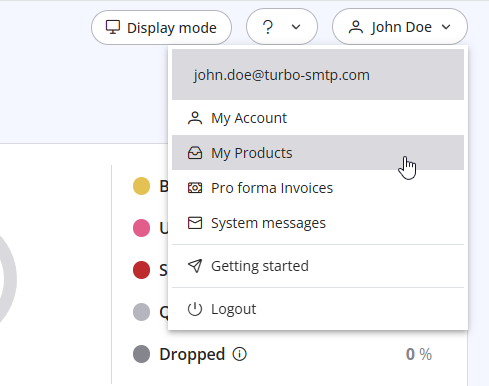
3. Click "Order New Plan" to proceed. 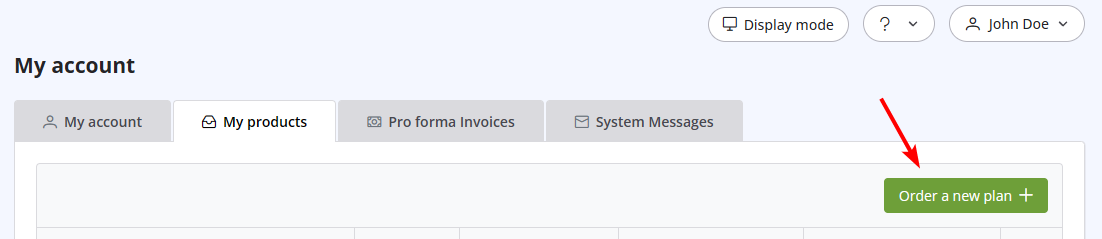
Also Read
41. Privacy Policy
(Görüntülenme: 1533916)
41. Privacy Policy (Görüntülenme: 1533916)
34. What is the difference between Smart Routing and Dedicated IP Pools?
(Görüntülenme: 436595)
34. What is the difference between Smart Routing and Dedicated IP Pools? (Görüntülenme: 436595)
12. I have more than one email address. Should I open multiple accounts?
(Görüntülenme: 1438924)
12. I have more than one email address. Should I open multiple accounts? (Görüntülenme: 1438924)
8. Can I manage my account online?
(Görüntülenme: 1451854)
8. Can I manage my account online? (Görüntülenme: 1451854)
26. Can I configure my DKIM, DMARC and SPF to get the highest delivery rates?
(Görüntülenme: 22182018)
26. Can I configure my DKIM, DMARC and SPF to get the highest delivery rates? (Görüntülenme: 22182018)
|
|

