
база знания
13. I want to change my plan. Can I do it?
You can order a new plan by following the steps below:
1. Log in to your dashboard.
2. Click on your name in the top right corner of the screen and select "My Products" from the dropdown menu.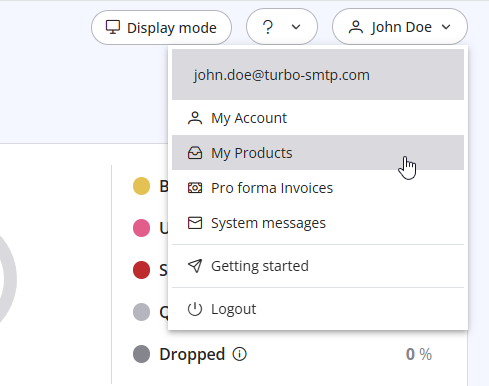
3. Click "Order New Plan" to proceed. 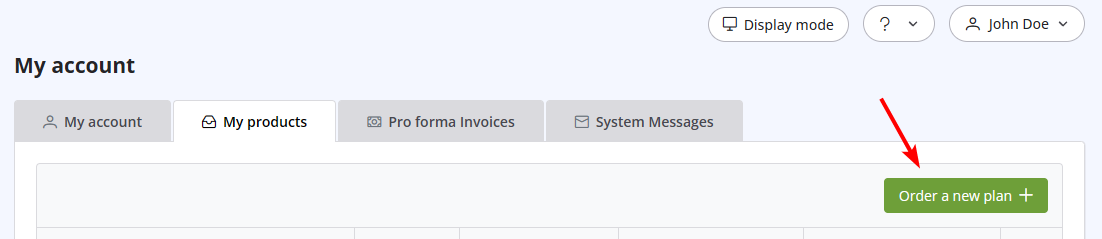
Също Прочетено
15. What if I want to cancel my monthly plan?
(Прегледи: 1441951)
15. What if I want to cancel my monthly plan? (Прегледи: 1441951)
26. Can I configure my DKIM, DMARC and SPF to get the highest delivery rates?
(Прегледи: 22181858)
26. Can I configure my DKIM, DMARC and SPF to get the highest delivery rates? (Прегледи: 22181858)
38. I have renewed my plan, but the email counter hasn't updated yet. Why?
(Прегледи: 1188557)
38. I have renewed my plan, but the email counter hasn't updated yet. Why? (Прегледи: 1188557)
20. My VAT number is not recognized when I pay using 2Checkout. Why?
(Прегледи: 1099973)
20. My VAT number is not recognized when I pay using 2Checkout. Why? (Прегледи: 1099973)
10. Is the email address with which I signed up the only one that I can use as a sender? (Прегледи: 972329)
|
|

