
Bilgi Merkezi
9. How can I change my password?
Changing your password is a quick and easy way to keep your account secure. Here's how to do it:
- Log in to your dashboard.
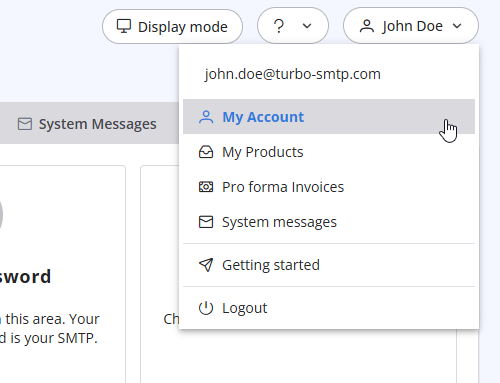
- Click on your name in the top-right corner of the screen and select "My Account" from the dropdown menu.
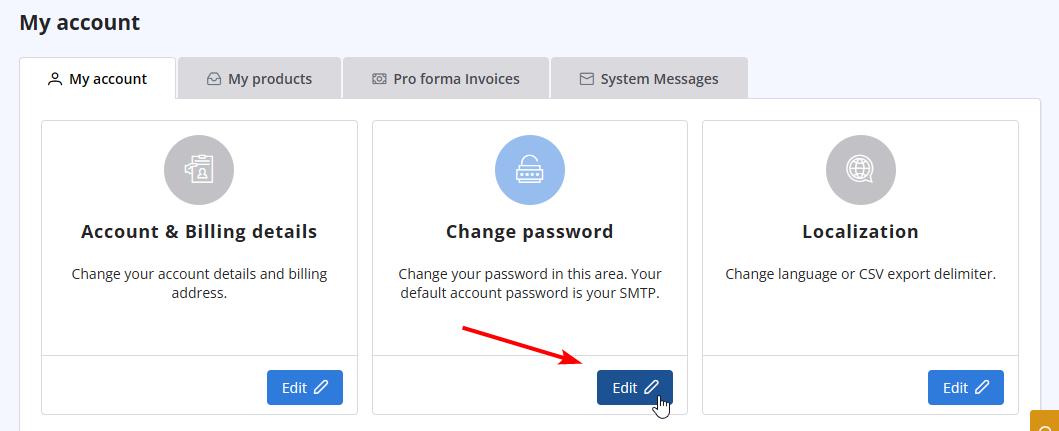
- Click on "Change Password" to update your password.
Also Read
23. What is a "dropped" email?
(Görüntülenme: 457566)
23. What is a "dropped" email? (Görüntülenme: 457566)
20. My VAT number is not recognized when I pay using 2Checkout. Why?
(Görüntülenme: 442584)
20. My VAT number is not recognized when I pay using 2Checkout. Why? (Görüntülenme: 442584)
40. Anti-Spam Policy
(Görüntülenme: 720730)
40. Anti-Spam Policy (Görüntülenme: 720730)
3. Can I use turboSMTP when I'm travelling abroad/overseas?
(Görüntülenme: 729188)
3. Can I use turboSMTP when I'm travelling abroad/overseas? (Görüntülenme: 729188)
41. Privacy Policy
(Görüntülenme: 790342)
41. Privacy Policy (Görüntülenme: 790342)
|
|

