
Hjälpcentral
9. How can I change my password?
Changing your password is a quick and easy way to keep your account secure. Here's how to do it:
- Log in to your dashboard.
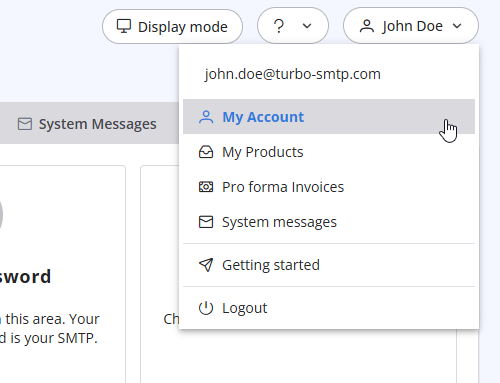
- Click on your name in the top-right corner of the screen and select "My Account" from the dropdown menu.
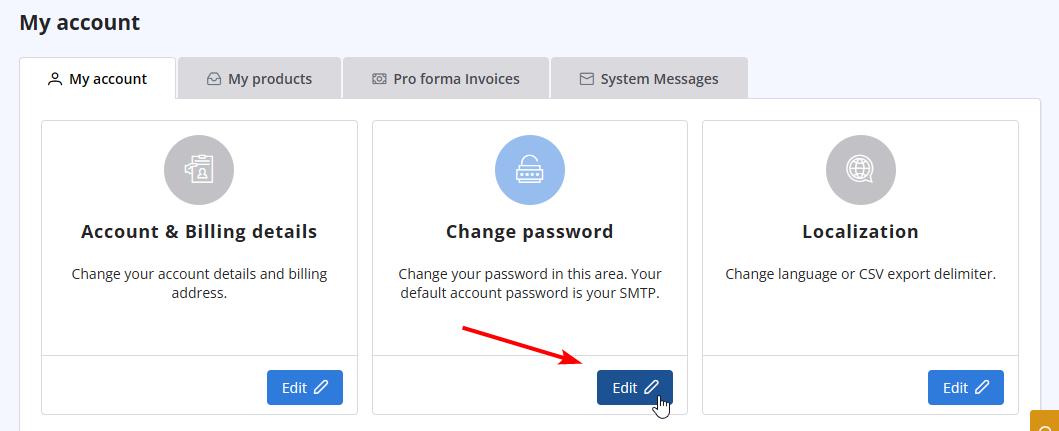
- Click on "Change Password" to update your password.
Läs även
41. Privacy Policy
(Visningar: 789726)
41. Privacy Policy (Visningar: 789726)
13. I want to change my plan. Can I do it?
(Visningar: 23055322)
13. I want to change my plan. Can I do it? (Visningar: 23055322)
10. Is the email address with which I signed up the only one that I can use as a sender? (Visningar: 381898)
22. Why my emails are going to the spam folder?
(Visningar: 664775)
22. Why my emails are going to the spam folder? (Visningar: 664775)
25. Can I send a PDF attached to my newsletter with turboSMTP?
(Visningar: 421340)
25. Can I send a PDF attached to my newsletter with turboSMTP? (Visningar: 421340)
|
|

