
Bilgi Merkezi
39. How can I submit a support ticket?
To get assistance, here's how you can quickly open a support ticket from your dashboard.
- Log in to your dashboard.
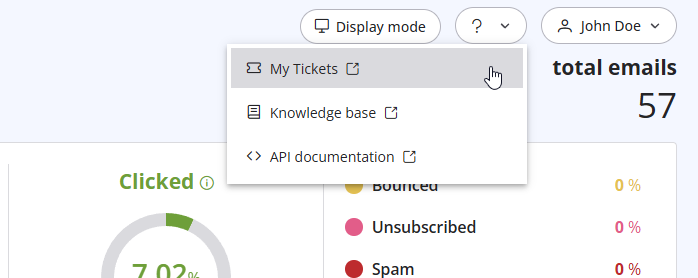
- Click the question mark (?) icon at the top of the pageand select "My Tickets" from the dropdown menu.
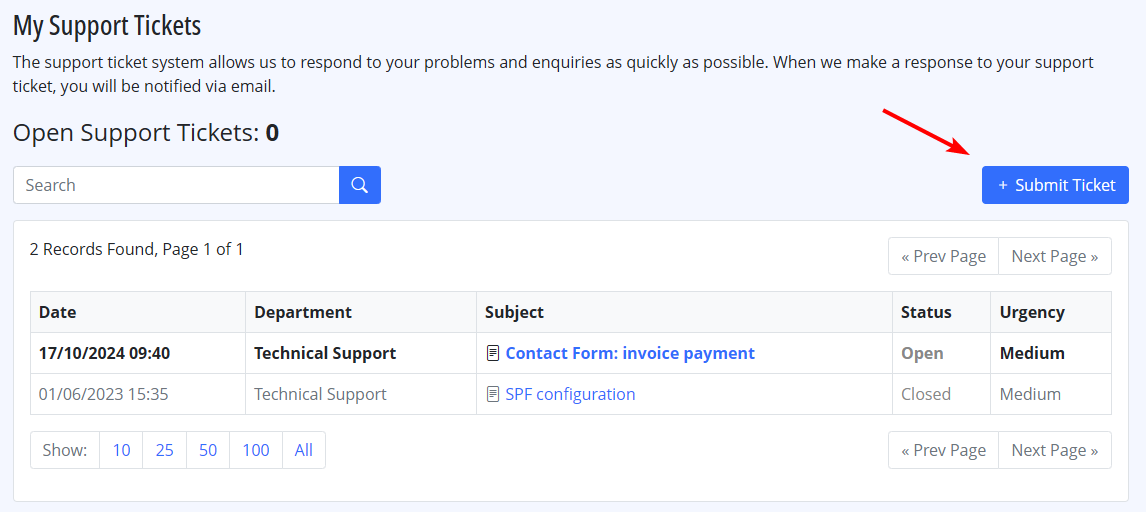
- Click on "Submit a Ticket" to create a new support request.
Also Read
23. What is a "dropped" email?
(Görüntülenme: 1132573)
23. What is a "dropped" email? (Görüntülenme: 1132573)
36. Why is turboSMTP still using the free emails even if I bought a paid plan?
(Görüntülenme: 1046076)
36. Why is turboSMTP still using the free emails even if I bought a paid plan? (Görüntülenme: 1046076)
21. I have made a payment, but the invoice seems still unpaid. What should I do?
(Görüntülenme: 1057644)
21. I have made a payment, but the invoice seems still unpaid. What should I do? (Görüntülenme: 1057644)
14. How can I cancel the auto-renewal of my plan?
(Görüntülenme: 1016596)
14. How can I cancel the auto-renewal of my plan? (Görüntülenme: 1016596)
9. How can I change my password?
(Görüntülenme: 955276)
9. How can I change my password? (Görüntülenme: 955276)
|
|

