
Bilgi Merkezi
13. I want to change my plan. Can I do it?
You can order a new plan by following the steps below:
1. Log in to your dashboard.
2. Click on your name in the top right corner of the screen and select "My Products" from the dropdown menu.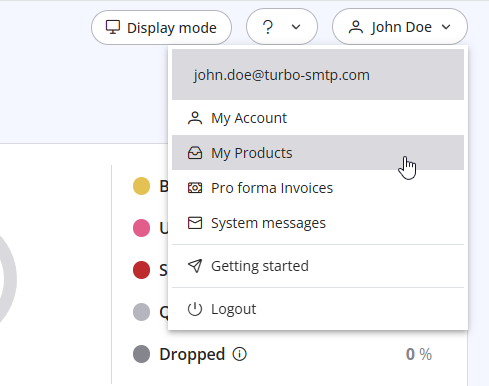
3. Click "Order New Plan" to proceed. 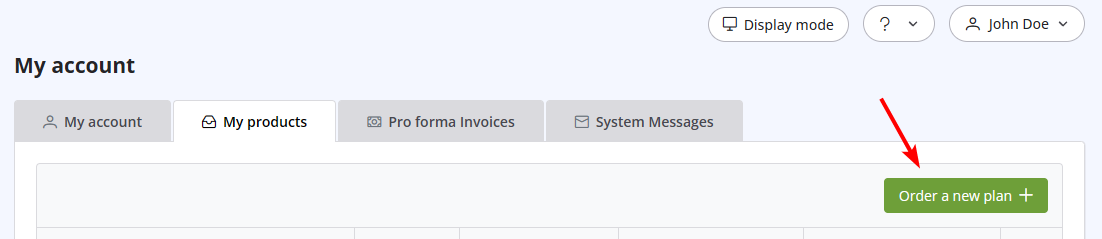
Also Read
19. Can I pay via wire transfer?
(Görüntülenme: 1042521)
19. Can I pay via wire transfer? (Görüntülenme: 1042521)
41. Privacy Policy
(Görüntülenme: 1534377)
41. Privacy Policy (Görüntülenme: 1534377)
5. Do I need a Credit Card to activate a Free Trial?
(Görüntülenme: 1007308)
5. Do I need a Credit Card to activate a Free Trial? (Görüntülenme: 1007308)
14. How can I cancel the auto-renewal of my plan?
(Görüntülenme: 991626)
14. How can I cancel the auto-renewal of my plan? (Görüntülenme: 991626)
1. What is turboSMTP?
(Görüntülenme: 1501229)
1. What is turboSMTP? (Görüntülenme: 1501229)
|
|

