
База знаний
13. I want to change my plan. Can I do it?
You can order a new plan by following the steps below:
1. Log in to your dashboard.
2. Click on your name in the top right corner of the screen and select "My Products" from the dropdown menu.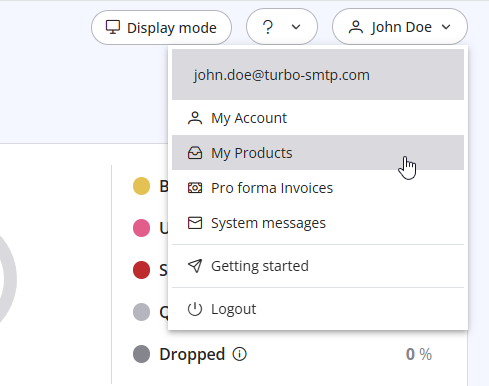
3. Click "Order New Plan" to proceed. 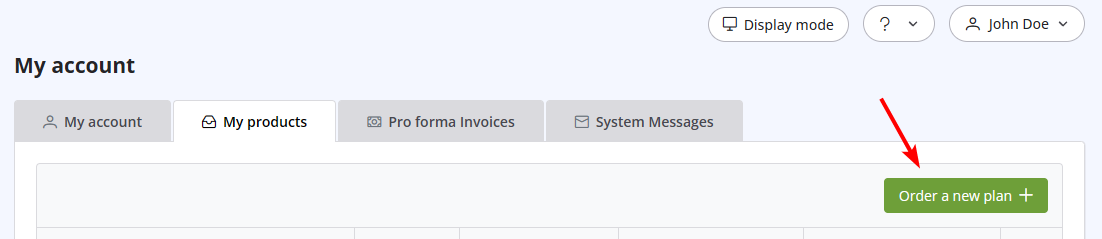
Также читают
4. Do you offer a Free Trial?
(просмотров: 1055227)
4. Do you offer a Free Trial? (просмотров: 1055227)
18. What types of payment do you accept?
(просмотров: 24951611)
18. What types of payment do you accept? (просмотров: 24951611)
29. What if the sender domain is not verified? (Re-enveloped Sender)
(просмотров: 1479581)
29. What if the sender domain is not verified? (Re-enveloped Sender) (просмотров: 1479581)
32. Yahoo emails in queue with high complain rate error
(просмотров: 726236)
32. Yahoo emails in queue with high complain rate error (просмотров: 726236)
11. Can I use as a sender a different email address from the one I subscribed with?
(просмотров: 940463)
11. Can I use as a sender a different email address from the one I subscribed with? (просмотров: 940463)
|
|

