
Baza wiedzy
13. I want to change my plan. Can I do it?
You can order a new plan by following the steps below:
1. Log in to your dashboard.
2. Click on your name in the top right corner of the screen and select "My Products" from the dropdown menu.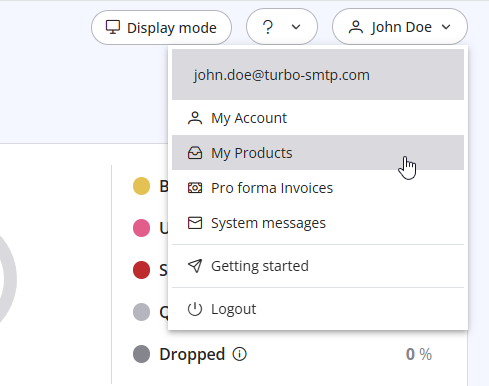
3. Click "Order New Plan" to proceed. 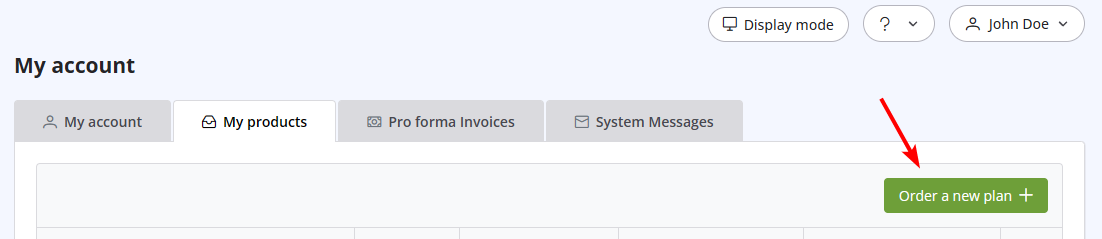
Przeczytaj również
29. Co, jeśli domena nadawcy nie jest zweryfikowana? (Nadawca z ponownym obwiednianiem) (Widoki: 1477873)
39. How can I submit a support ticket?
(Widoki: 1119955)
39. How can I submit a support ticket? (Widoki: 1119955)
14. How can I cancel the auto-renewal of my plan?
(Widoki: 1011264)
14. How can I cancel the auto-renewal of my plan? (Widoki: 1011264)
17. How do I keep track of sent emails?
(Widoki: 1591809)
17. How do I keep track of sent emails? (Widoki: 1591809)
12. I have more than one email address. Should I open multiple accounts?
(Widoki: 1451901)
12. I have more than one email address. Should I open multiple accounts? (Widoki: 1451901)
|
|

