
Kennisbank
9. How can I change my password?
Changing your password is a quick and easy way to keep your account secure. Here's how to do it:
- Log in to your dashboard.
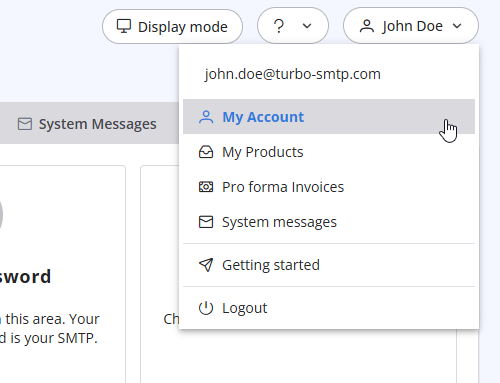
- Click on your name in the top-right corner of the screen and select "My Account" from the dropdown menu.
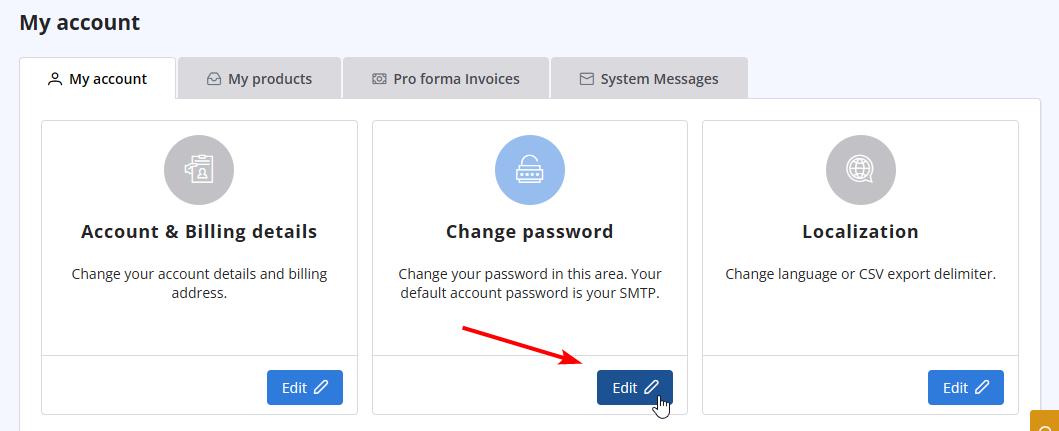
- Click on "Change Password" to update your password.
Lees ook
19. Can I pay via wire transfer?
(Bekeken: 1068092)
19. Can I pay via wire transfer? (Bekeken: 1068092)
15. What if I want to cancel my monthly plan?
(Bekeken: 1455766)
15. What if I want to cancel my monthly plan? (Bekeken: 1455766)
20. My VAT number is not recognized when I pay using 2Checkout. Why?
(Bekeken: 1115583)
20. My VAT number is not recognized when I pay using 2Checkout. Why? (Bekeken: 1115583)
32. Yahoo emails in queue with high complain rate error
(Bekeken: 729968)
32. Yahoo emails in queue with high complain rate error (Bekeken: 729968)
25. Can I send a PDF attached to my newsletter with turboSMTP?
(Bekeken: 1027649)
25. Can I send a PDF attached to my newsletter with turboSMTP? (Bekeken: 1027649)
|
|

