
Γνωσιακή Βάση
9. How can I change my password?
Changing your password is a quick and easy way to keep your account secure. Here's how to do it:
- Log in to your dashboard.
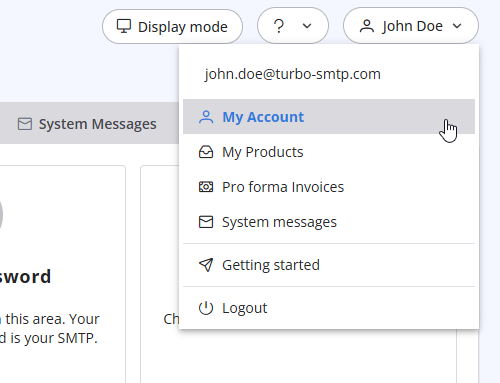
- Click on your name in the top-right corner of the screen and select "My Account" from the dropdown menu.
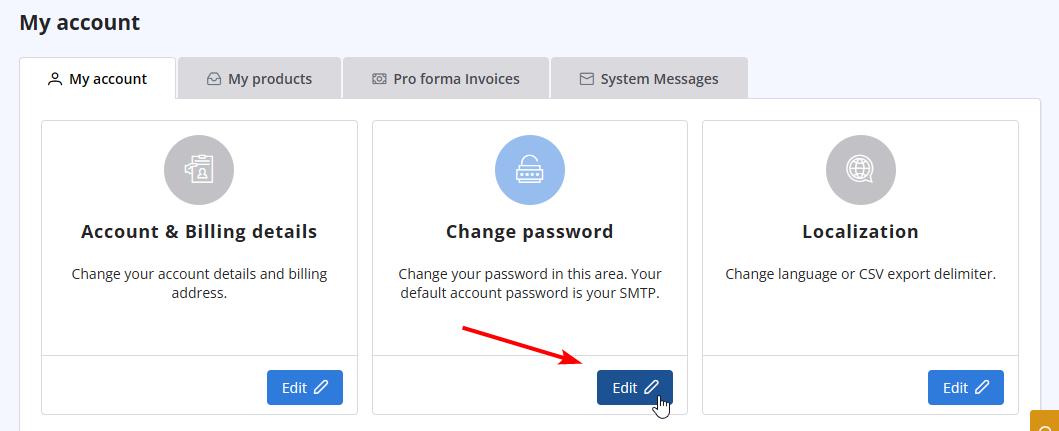
- Click on "Change Password" to update your password.
Διαβάστε Επίσης
1. What is turboSMTP?
(Προβολές: 1446687)
1. What is turboSMTP? (Προβολές: 1446687)
33. What is Smart Routing?
(Προβολές: 335242)
33. What is Smart Routing? (Προβολές: 335242)
35. My ISP blocks outgoing mail on port 25. What can I do?
(Προβολές: 25274179)
35. My ISP blocks outgoing mail on port 25. What can I do? (Προβολές: 25274179)
5. Do I need a Credit Card to activate a Free Trial?
(Προβολές: 926309)
5. Do I need a Credit Card to activate a Free Trial? (Προβολές: 926309)
41. Privacy Policy
(Προβολές: 1433988)
41. Privacy Policy (Προβολές: 1433988)
|
|

