
Γνωσιακή Βάση
9. How can I change my password?
Changing your password is a quick and easy way to keep your account secure. Here's how to do it:
- Log in to your dashboard.
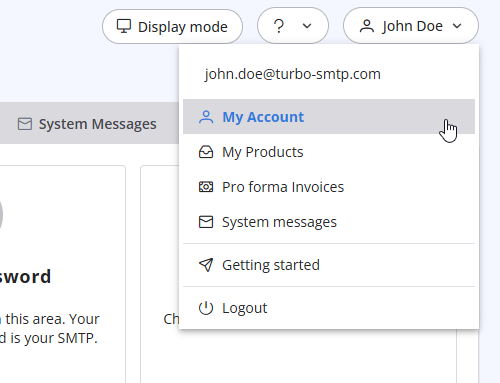
- Click on your name in the top-right corner of the screen and select "My Account" from the dropdown menu.
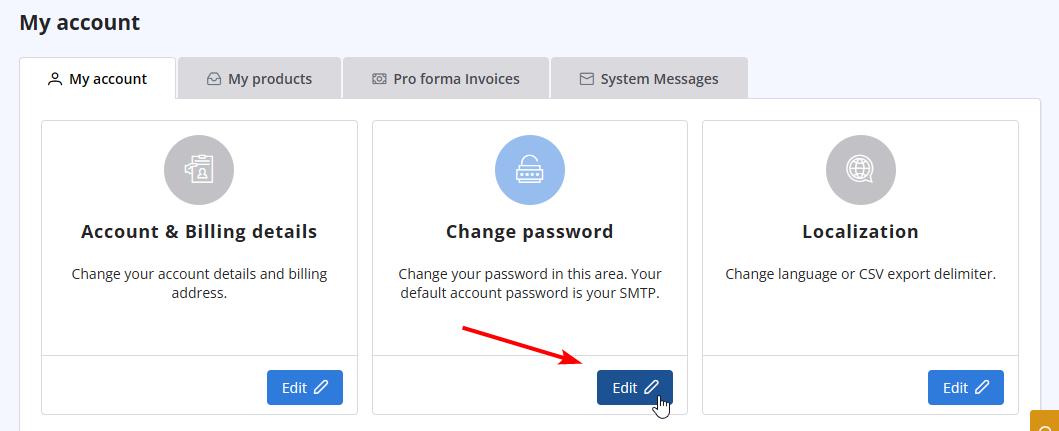
- Click on "Change Password" to update your password.
Διαβάστε Επίσης
2. Which email clients are compatible with turboSMTP?
(Προβολές: 1320331)
2. Which email clients are compatible with turboSMTP? (Προβολές: 1320331)
10. Is the email address with which I signed up the only one that I can use as a sender? (Προβολές: 991355)
33. What is Smart Routing?
(Προβολές: 423937)
33. What is Smart Routing? (Προβολές: 423937)
16. How many emails can I send in a day? What is the maximum attachment size?
(Προβολές: 1509507)
16. How many emails can I send in a day? What is the maximum attachment size? (Προβολές: 1509507)
30. Can I use turboSMTP with Outlook or Thunderbird and send a mass email via CC/BCC? (Προβολές: 897817)
|
|

