
база знания
13. I want to change my plan. Can I do it?
You can order a new plan by following the steps below:
1. Log in to your dashboard.
2. Click on your name in the top right corner of the screen and select "My Products" from the dropdown menu.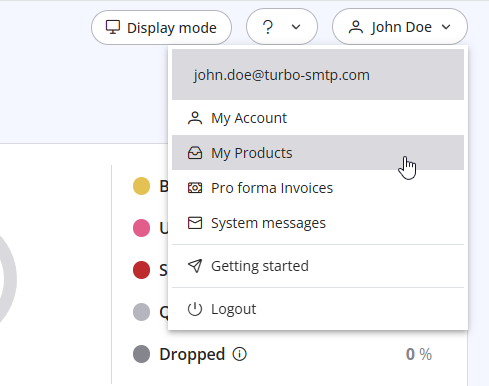
3. Click "Order New Plan" to proceed. 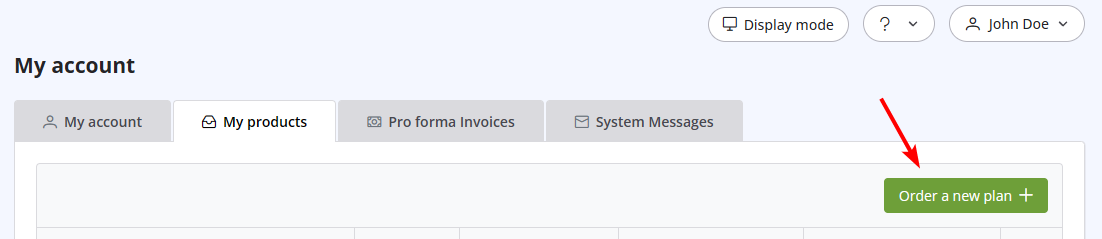
Също Прочетено
14. How can I cancel the auto-renewal of my plan?
(Прегледи: 1017140)
14. How can I cancel the auto-renewal of my plan? (Прегледи: 1017140)
37. I just purchased a monthly plan/prepaid but I can't send emails. Why?
(Прегледи: 2355713)
37. I just purchased a monthly plan/prepaid but I can't send emails. Why? (Прегледи: 2355713)
31. How can I get notified of my bounce?
(Прегледи: 964562)
31. How can I get notified of my bounce? (Прегледи: 964562)
36. Why is turboSMTP still using the free emails even if I bought a paid plan?
(Прегледи: 1047035)
36. Why is turboSMTP still using the free emails even if I bought a paid plan? (Прегледи: 1047035)
33. What is Smart Routing?
(Прегледи: 423801)
33. What is Smart Routing? (Прегледи: 423801)
|
|

