
Bilgi Merkezi
13. I want to change my plan. Can I do it?
You can order a new plan by following the steps below:
1. Log in to your dashboard.
2. Click on your name in the top right corner of the screen and select "My Products" from the dropdown menu.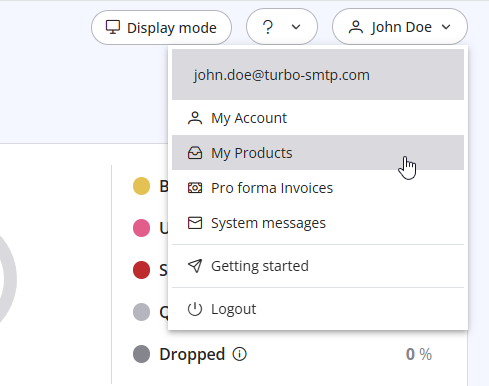
3. Click "Order New Plan" to proceed. 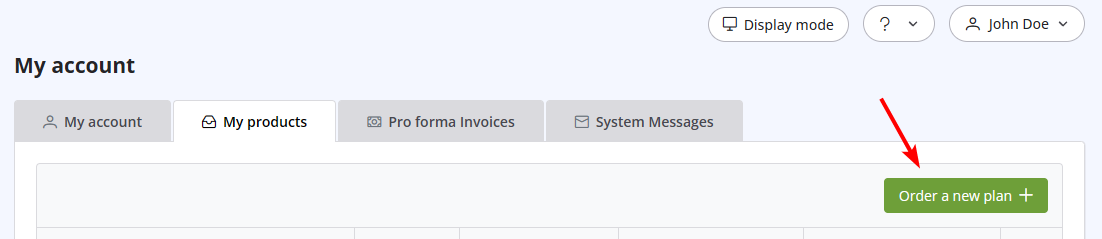
Also Read
33. What is Smart Routing?
(Görüntülenme: 97288)
33. What is Smart Routing? (Görüntülenme: 97288)
7. Why my free account has been closed?
(Görüntülenme: 399469)
7. Why my free account has been closed? (Görüntülenme: 399469)
36. Why is turboSMTP still using the free emails even if I bought a paid plan?
(Görüntülenme: 455581)
36. Why is turboSMTP still using the free emails even if I bought a paid plan? (Görüntülenme: 455581)
30. Can I use turboSMTP with Outlook or Thunderbird and send a mass email via CC/BCC?
(Görüntülenme: 429468)
30. Can I use turboSMTP with Outlook or Thunderbird and send a mass email via CC/BCC? (Görüntülenme: 429468)
39. How can I submit a support ticket?
(Görüntülenme: 489636)
39. How can I submit a support ticket? (Görüntülenme: 489636)
|
|

