
Bilgi Merkezi
13. I want to change my plan. Can I do it?
You can order a new plan by following the steps below:
1. Log in to your dashboard.
2. Click on your name in the top right corner of the screen and select "My Products" from the dropdown menu.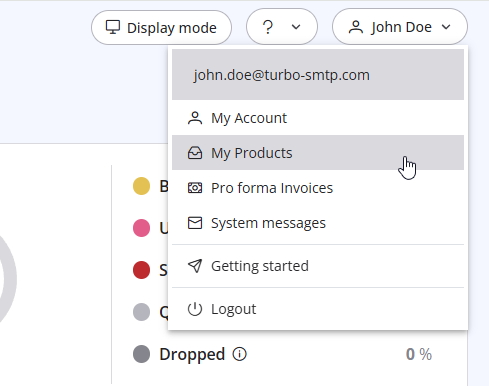
3. Click "Order New Plan" to proceed. 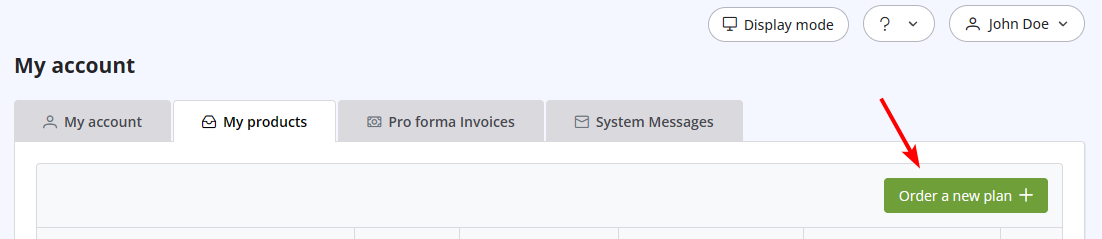
Also Read
31. How can I get notified of my bounce?
(Görüntülenme: 990964)
31. How can I get notified of my bounce? (Görüntülenme: 990964)
2. Which email clients are compatible with turboSMTP?
(Görüntülenme: 1339532)
2. Which email clients are compatible with turboSMTP? (Görüntülenme: 1339532)
6. Is the Free Trial automatically activated to all new accounts?
(Görüntülenme: 1050866)
6. Is the Free Trial automatically activated to all new accounts? (Görüntülenme: 1050866)
10. Is the email address with which I signed up the only one that I can use as a sender?
(Görüntülenme: 1029520)
10. Is the email address with which I signed up the only one that I can use as a sender? (Görüntülenme: 1029520)
37. I just purchased a monthly plan/prepaid but I can't send emails. Why?
(Görüntülenme: 2444676)
37. I just purchased a monthly plan/prepaid but I can't send emails. Why? (Görüntülenme: 2444676)
|
|

