
Bilgi Merkezi
13. I want to change my plan. Can I do it?
You can order a new plan by following the steps below:
1. Log in to your dashboard.
2. Click on your name in the top right corner of the screen and select "My Products" from the dropdown menu.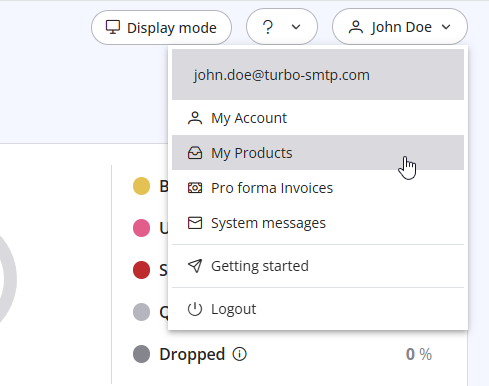
3. Click "Order New Plan" to proceed. 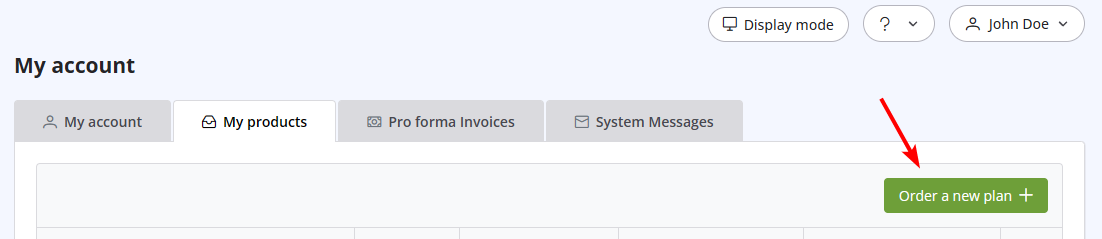
Also Read
35. My ISP blocks outgoing mail on port 25. What can I do?
(Görüntülenme: 25431403)
35. My ISP blocks outgoing mail on port 25. What can I do? (Görüntülenme: 25431403)
15. Aylık planımı iptal ettirirsem ne olur?
(Görüntülenme: 1452895)
15. Aylık planımı iptal ettirirsem ne olur? (Görüntülenme: 1452895)
21. I have made a payment, but the invoice seems still unpaid. What should I do?
(Görüntülenme: 1050542)
21. I have made a payment, but the invoice seems still unpaid. What should I do? (Görüntülenme: 1050542)
28. The string ”user = @ user.com turbo-smtp.com; On behalf of; <user@userdomain.com>”, appears in recipient's sender field . What does it mean? (Görüntülenme: 1396635)
1. What is turboSMTP?
(Görüntülenme: 1517025)
1. What is turboSMTP? (Görüntülenme: 1517025)
|
|

