
Bilgi Merkezi
31. How can I get notified of my bounce?
Want to keep a close eye on your bounce notifications? You can easily choose how to receive them directly in your inbox or let turboSMTP manage them for you.
Here’s how to set your preferences.
- Log in to your dashboard.
- Click on the Settings tab on the left-hand menu.
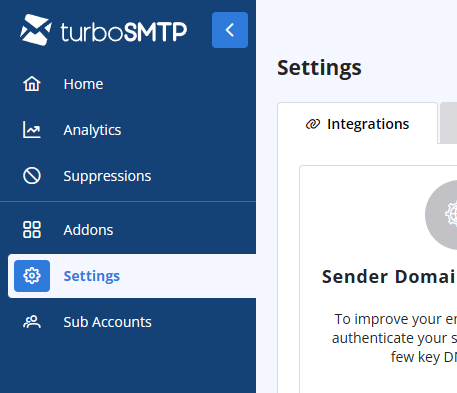
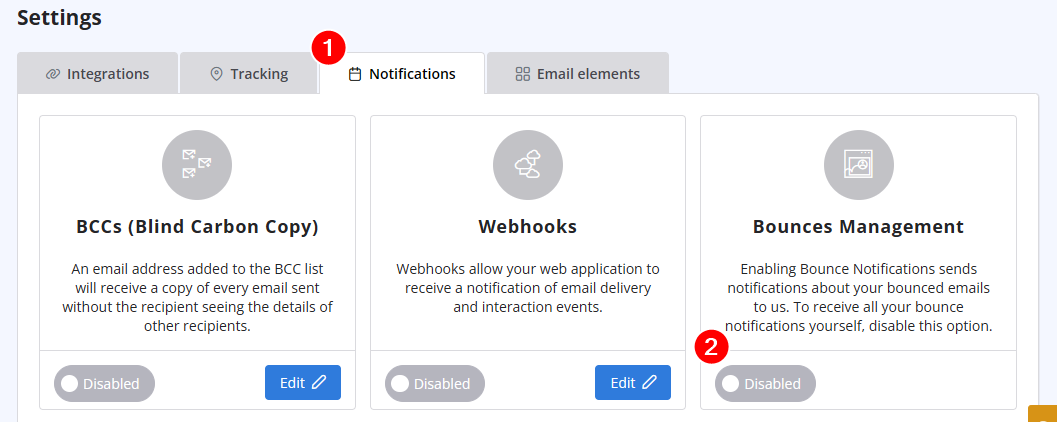
- Select Notifications from the options. and disable "Bounces management" if you prefer to receive all bounce notifications directly.
Also Read
16. How many emails can I send in a day? What is the maximum attachment size?
(Görüntülenme: 1505494)
16. How many emails can I send in a day? What is the maximum attachment size? (Görüntülenme: 1505494)
36. Why is turboSMTP still using the free emails even if I bought a paid plan?
(Görüntülenme: 1034254)
36. Why is turboSMTP still using the free emails even if I bought a paid plan? (Görüntülenme: 1034254)
4. Do you offer a Free Trial?
(Görüntülenme: 1054302)
4. Do you offer a Free Trial? (Görüntülenme: 1054302)
35. My ISP blocks outgoing mail on port 25. What can I do?
(Görüntülenme: 25437330)
35. My ISP blocks outgoing mail on port 25. What can I do? (Görüntülenme: 25437330)
18. What types of payment do you accept?
(Görüntülenme: 24939935)
18. What types of payment do you accept? (Görüntülenme: 24939935)
|
|

