
Bilgi Merkezi
13. I want to change my plan. Can I do it?
You can order a new plan by following the steps below:
1. Log in to your dashboard.
2. Click on your name in the top right corner of the screen and select "My Products" from the dropdown menu.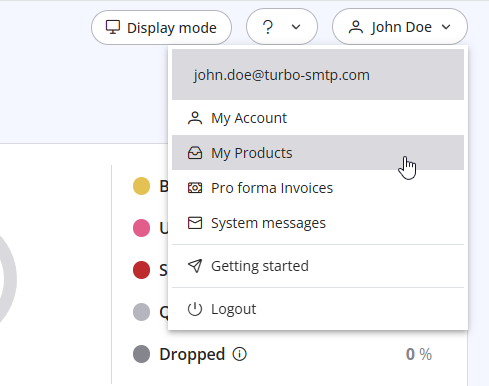
3. Click "Order New Plan" to proceed. 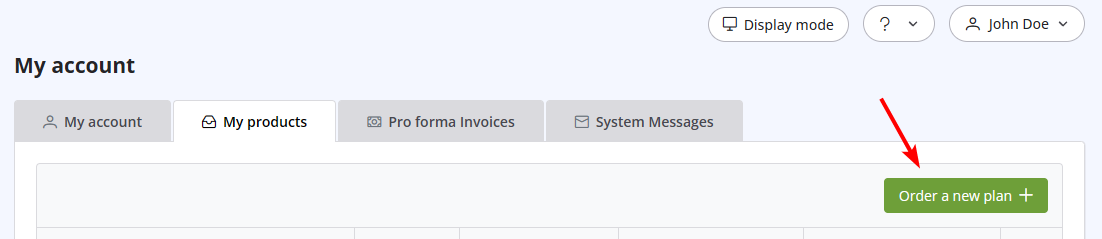
Also Read
35. My ISP blocks outgoing mail on port 25. What can I do?
(Görüntülenme: 25438982)
35. My ISP blocks outgoing mail on port 25. What can I do? (Görüntülenme: 25438982)
32. Yahoo emails in queue with high complain rate error
(Görüntülenme: 724101)
32. Yahoo emails in queue with high complain rate error (Görüntülenme: 724101)
24. How can I ask the permission to send a newsletter?
(Görüntülenme: 1024885)
24. How can I ask the permission to send a newsletter? (Görüntülenme: 1024885)
7. Why my free account has been closed?
(Görüntülenme: 940288)
7. Why my free account has been closed? (Görüntülenme: 940288)
8. Can I manage my account online?
(Görüntülenme: 1464251)
8. Can I manage my account online? (Görüntülenme: 1464251)
|
|

