
Hjälpcentral
13. I want to change my plan. Can I do it?
You can order a new plan by following the steps below:
1. Log in to your dashboard.
2. Click on your name in the top right corner of the screen and select "My Products" from the dropdown menu.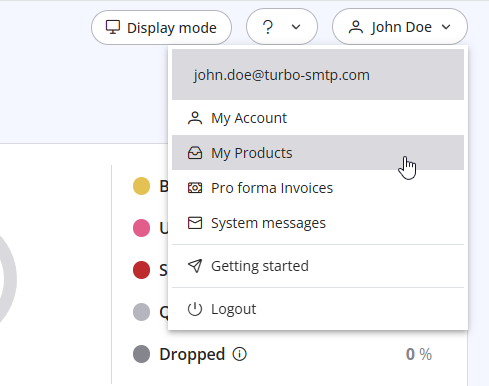
3. Click "Order New Plan" to proceed. 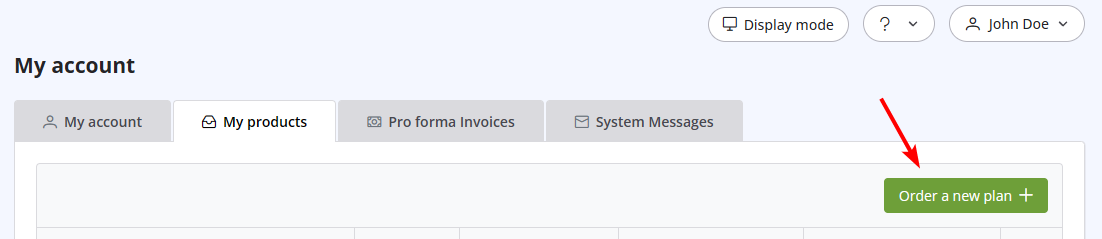
Läs även
29. Vad händer om avsändardomänen inte är verifierad? (Re-enveloped Avsändare)
(Visningar: 1436000)
29. Vad händer om avsändardomänen inte är verifierad? (Re-enveloped Avsändare) (Visningar: 1436000)
10. Is the email address with which I signed up the only one that I can use as a sender? (Visningar: 963252)
36. Why is turboSMTP still using the free emails even if I bought a paid plan?
(Visningar: 983188)
36. Why is turboSMTP still using the free emails even if I bought a paid plan? (Visningar: 983188)
26. Can I configure my DKIM, DMARC and SPF to get the highest delivery rates?
(Visningar: 22134824)
26. Can I configure my DKIM, DMARC and SPF to get the highest delivery rates? (Visningar: 22134824)
18. What types of payment do you accept?
(Visningar: 24779979)
18. What types of payment do you accept? (Visningar: 24779979)
|
|

