
Hjälpcentral
31. How can I get notified of my bounce?
Want to keep a close eye on your bounce notifications? You can easily choose how to receive them directly in your inbox or let turboSMTP manage them for you.
Here’s how to set your preferences.
- Log in to your dashboard.
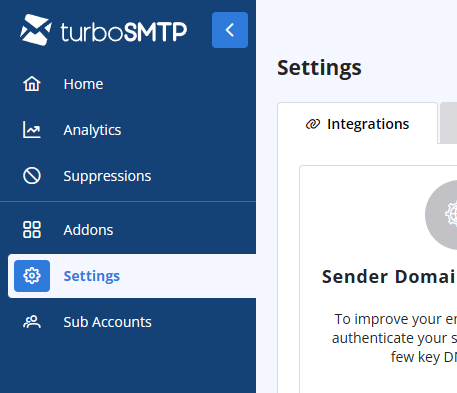
- Click on the Settings tab on the left-hand menu.
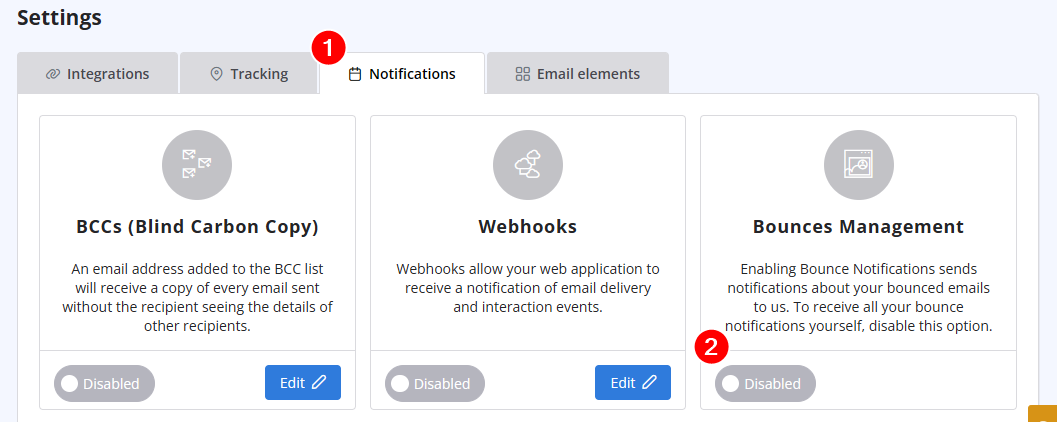
- Select Notifications from the options. and disable "Bounces management" if you prefer to receive all bounce notifications directly.
Läs även
40. Anti-Spam Policy
(Visningar: 1391179)
40. Anti-Spam Policy (Visningar: 1391179)
11. Can I use as a sender a different email address from the one I subscribed with? (Visningar: 950123)
2. Which email clients are compatible with turboSMTP?
(Visningar: 1320304)
2. Which email clients are compatible with turboSMTP? (Visningar: 1320304)
28. The string ”user = @ user.com turbo-smtp.com; On behalf of; <user@userdomain.com>”, appears in recipient's sender field . What does it mean? (Visningar: 1403598)
41. Privacy Policy
(Visningar: 1550441)
41. Privacy Policy (Visningar: 1550441)
|
|

