
Hjälpcentral
39. How can I submit a support ticket?
To get assistance, here's how you can quickly open a support ticket from your dashboard.
- Log in to your dashboard.
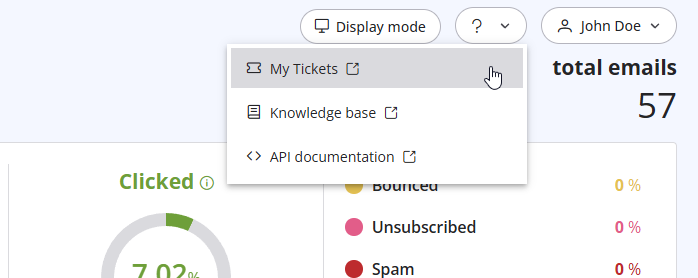
- Click the question mark (?) icon at the top of the pageand select "My Tickets" from the dropdown menu.
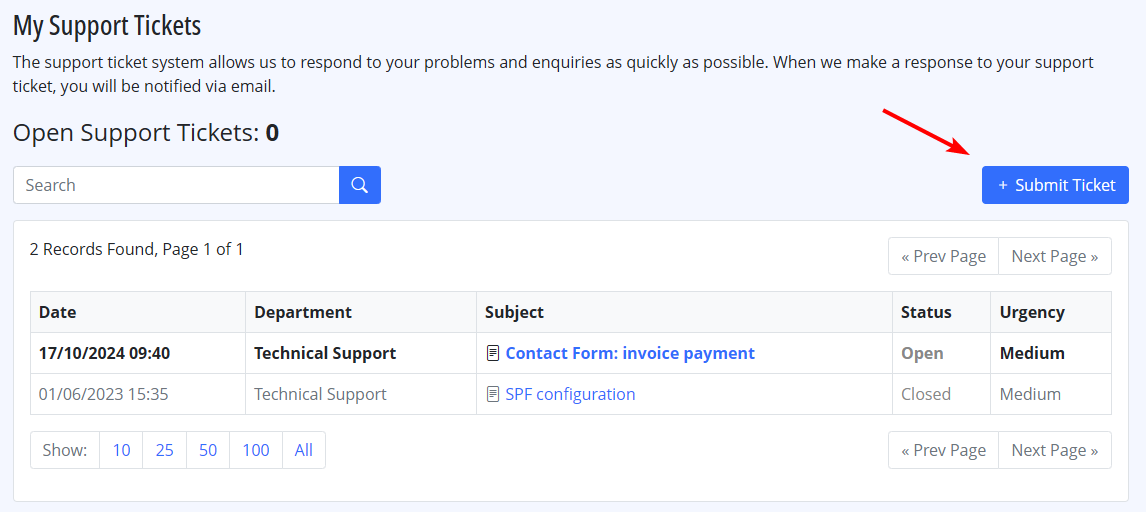
- Click on "Submit a Ticket" to create a new support request.
Läs även
7. Why my free account has been closed?
(Visningar: 892107)
7. Why my free account has been closed? (Visningar: 892107)
41. Privacy Policy
(Visningar: 1486664)
41. Privacy Policy (Visningar: 1486664)
38. I have renewed my plan, but the email counter hasn't updated yet. Why?
(Visningar: 1101696)
38. I have renewed my plan, but the email counter hasn't updated yet. Why? (Visningar: 1101696)
4. Do you offer a Free Trial?
(Visningar: 1008735)
4. Do you offer a Free Trial? (Visningar: 1008735)
11. Can I use as a sender a different email address from the one I subscribed with? (Visningar: 884184)
|
|

