
Hjälpcentral
13. I want to change my plan. Can I do it?
You can order a new plan by following the steps below:
1. Log in to your dashboard.
2. Click on your name in the top right corner of the screen and select "My Products" from the dropdown menu.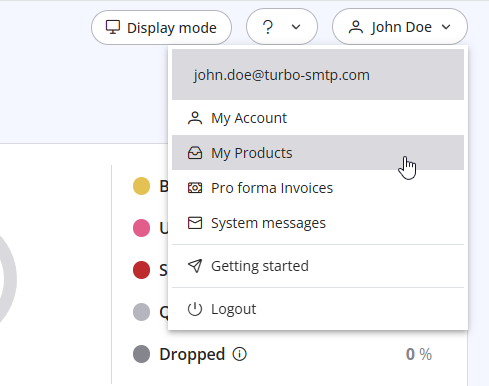
3. Click "Order New Plan" to proceed. 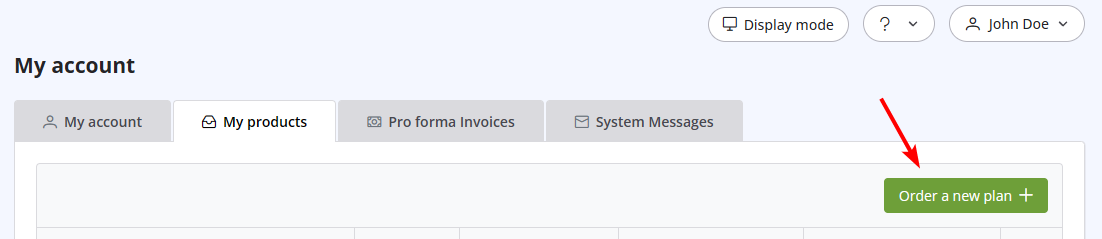
Läs även
37. I just purchased a monthly plan/prepaid but I can't send emails. Why?
(Visningar: 2334549)
37. I just purchased a monthly plan/prepaid but I can't send emails. Why? (Visningar: 2334549)
14. How can I cancel the auto-renewal of my plan?
(Visningar: 1016898)
14. How can I cancel the auto-renewal of my plan? (Visningar: 1016898)
27. I cannot configure the DNS of my domain. How can I do?
(Visningar: 994527)
27. I cannot configure the DNS of my domain. How can I do? (Visningar: 994527)
35. My ISP blocks outgoing mail on port 25. What can I do?
(Visningar: 25467904)
35. My ISP blocks outgoing mail on port 25. What can I do? (Visningar: 25467904)
26. Can I configure my DKIM, DMARC and SPF to get the highest delivery rates?
(Visningar: 22266164)
26. Can I configure my DKIM, DMARC and SPF to get the highest delivery rates? (Visningar: 22266164)
|
|

