
Hjälpcentral
13. I want to change my plan. Can I do it?
You can order a new plan by following the steps below:
1. Log in to your dashboard.
2. Click on your name in the top right corner of the screen and select "My Products" from the dropdown menu.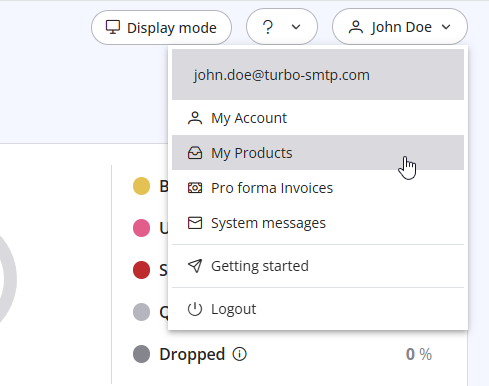
3. Click "Order New Plan" to proceed. 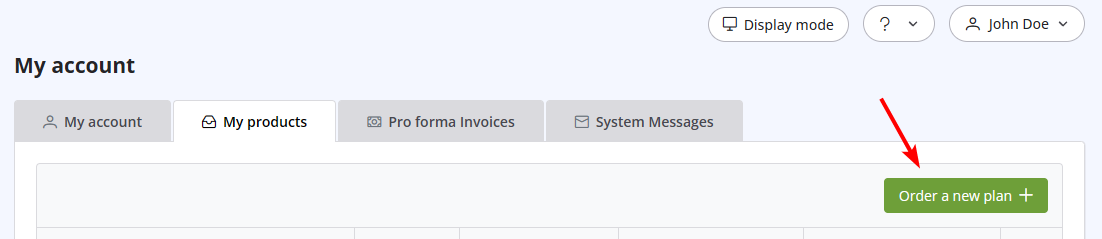
Läs även
21. I have made a payment, but the invoice seems still unpaid. What should I do?
(Visningar: 1064645)
21. I have made a payment, but the invoice seems still unpaid. What should I do? (Visningar: 1064645)
37. I just purchased a monthly plan/prepaid but I can't send emails. Why?
(Visningar: 2422944)
37. I just purchased a monthly plan/prepaid but I can't send emails. Why? (Visningar: 2422944)
15. What if I want to cancel my monthly plan?
(Visningar: 1463800)
15. What if I want to cancel my monthly plan? (Visningar: 1463800)
5. Do I need a Credit Card to activate a Free Trial?
(Visningar: 1035506)
5. Do I need a Credit Card to activate a Free Trial? (Visningar: 1035506)
7. Why my free account has been closed?
(Visningar: 949693)
7. Why my free account has been closed? (Visningar: 949693)
|
|

