
Hjälpcentral
13. I want to change my plan. Can I do it?
You can order a new plan by following the steps below:
1. Log in to your dashboard.
2. Click on your name in the top right corner of the screen and select "My Products" from the dropdown menu.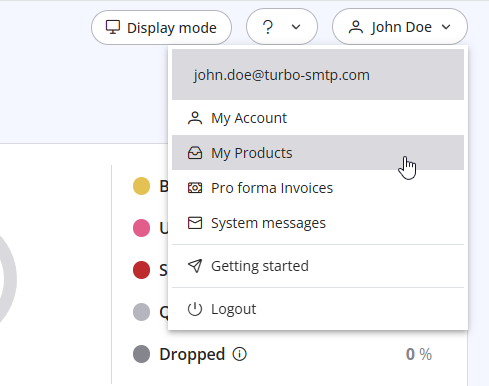
3. Click "Order New Plan" to proceed. 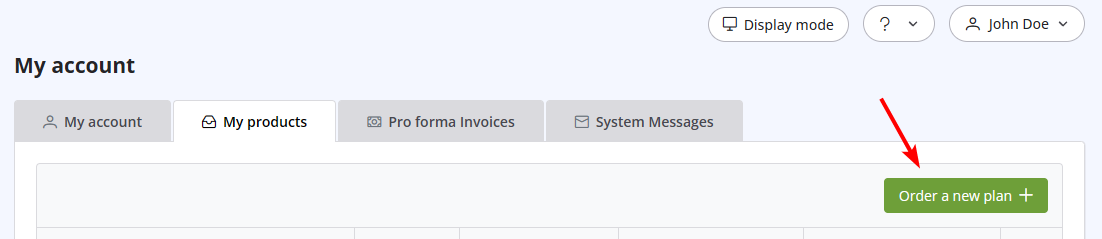
Läs även
3. Can I use turboSMTP when I'm travelling abroad/overseas?
(Visningar: 1474165)
3. Can I use turboSMTP when I'm travelling abroad/overseas? (Visningar: 1474165)
20. My VAT number is not recognized when I pay using 2Checkout. Why?
(Visningar: 1115907)
20. My VAT number is not recognized when I pay using 2Checkout. Why? (Visningar: 1115907)
38. I have renewed my plan, but the email counter hasn't updated yet. Why?
(Visningar: 1243240)
38. I have renewed my plan, but the email counter hasn't updated yet. Why? (Visningar: 1243240)
31. How can I get notified of my bounce?
(Visningar: 963387)
31. How can I get notified of my bounce? (Visningar: 963387)
8. Can I manage my account online?
(Visningar: 1469345)
8. Can I manage my account online? (Visningar: 1469345)
|
|

