
База знаний
13. I want to change my plan. Can I do it?
You can order a new plan by following the steps below:
1. Log in to your dashboard.
2. Click on your name in the top right corner of the screen and select "My Products" from the dropdown menu.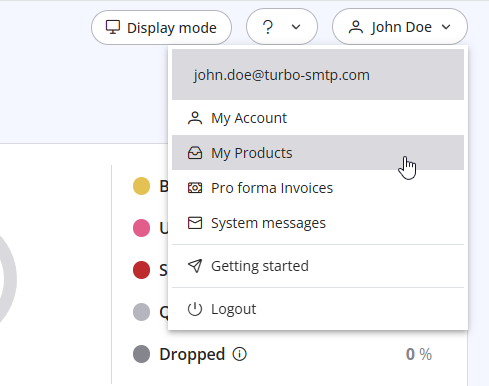
3. Click "Order New Plan" to proceed. 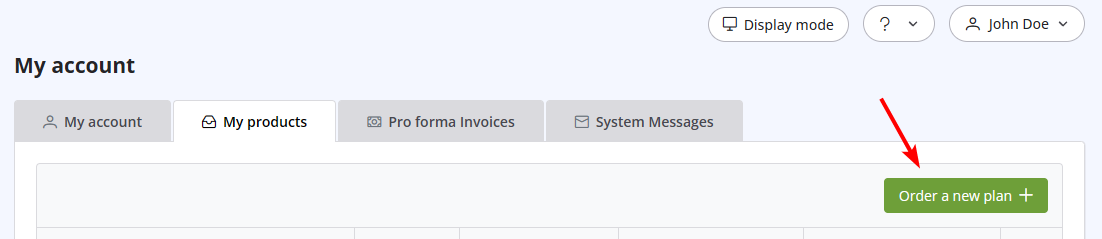
Также читают
36. Why is turboSMTP still using the free emails even if I bought a paid plan?
(просмотров: 1083100)
36. Why is turboSMTP still using the free emails even if I bought a paid plan? (просмотров: 1083100)
38. I have renewed my plan, but the email counter hasn't updated yet. Why?
(просмотров: 1306820)
38. I have renewed my plan, but the email counter hasn't updated yet. Why? (просмотров: 1306820)
39. How can I submit a support ticket?
(просмотров: 1158679)
39. How can I submit a support ticket? (просмотров: 1158679)
29. What if the sender domain is not verified? (Re-enveloped Sender)
(просмотров: 1507097)
29. What if the sender domain is not verified? (Re-enveloped Sender) (просмотров: 1507097)
34. What is the difference between Smart Routing and Dedicated IP Pools?
(просмотров: 494251)
34. What is the difference between Smart Routing and Dedicated IP Pools? (просмотров: 494251)
|
|

