
Baza wiedzy
9. How can I change my password?
Changing your password is a quick and easy way to keep your account secure. Here's how to do it:
- Log in to your dashboard.
- Click on your name in the top-right corner of the screen and select "My Account" from the dropdown menu.
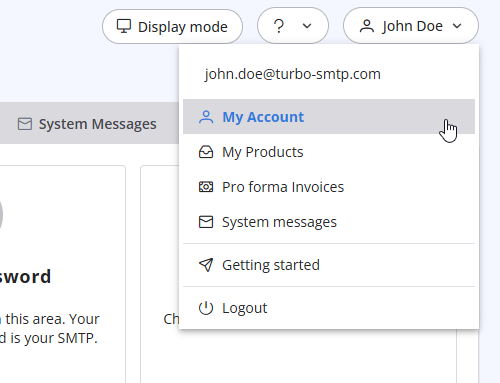
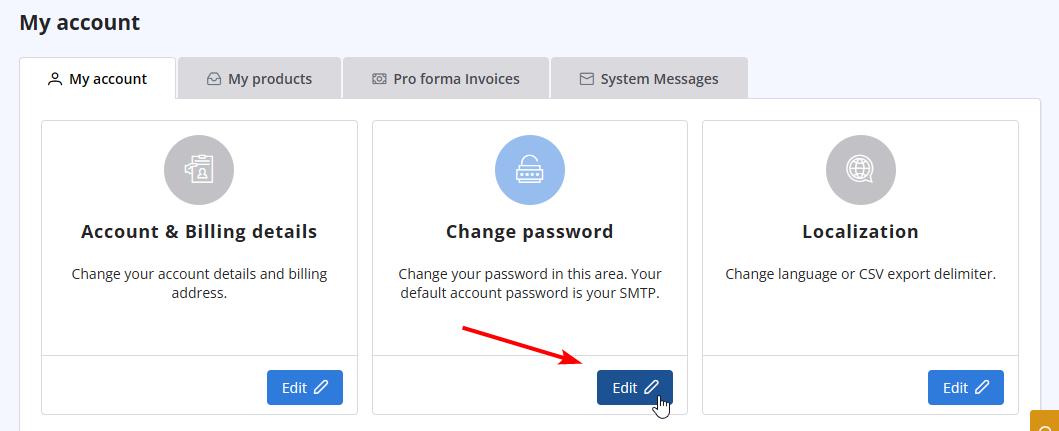
- Click on "Change Password" to update your password.
Przeczytaj również
17. How do I keep track of sent emails?
(Widoki: 822535)
17. How do I keep track of sent emails? (Widoki: 822535)
28. The string ”user = @ user.com turbo-smtp.com; On behalf of; <user@userdomain.com>”, appears in recipient's sender field . What does it mean? (Widoki: 710042)
25. Can I send a PDF attached to my newsletter with turboSMTP?
(Widoki: 421376)
25. Can I send a PDF attached to my newsletter with turboSMTP? (Widoki: 421376)
11. Can I use as a sender a different email address from the one I subscribed with? (Widoki: 338615)
6. Is the Free Trial automatically activated to all new accounts?
(Widoki: 397486)
6. Is the Free Trial automatically activated to all new accounts? (Widoki: 397486)
|
|

