
Kennisbank
9. How can I change my password?
Changing your password is a quick and easy way to keep your account secure. Here's how to do it:
- Log in to your dashboard.
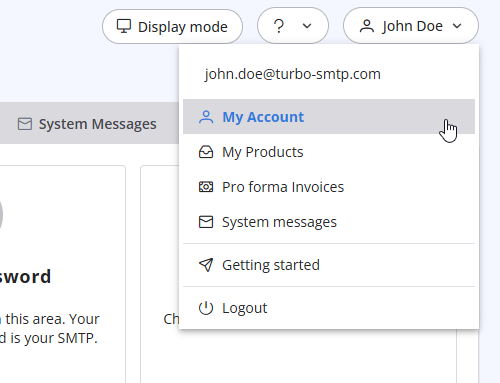
- Click on your name in the top-right corner of the screen and select "My Account" from the dropdown menu.
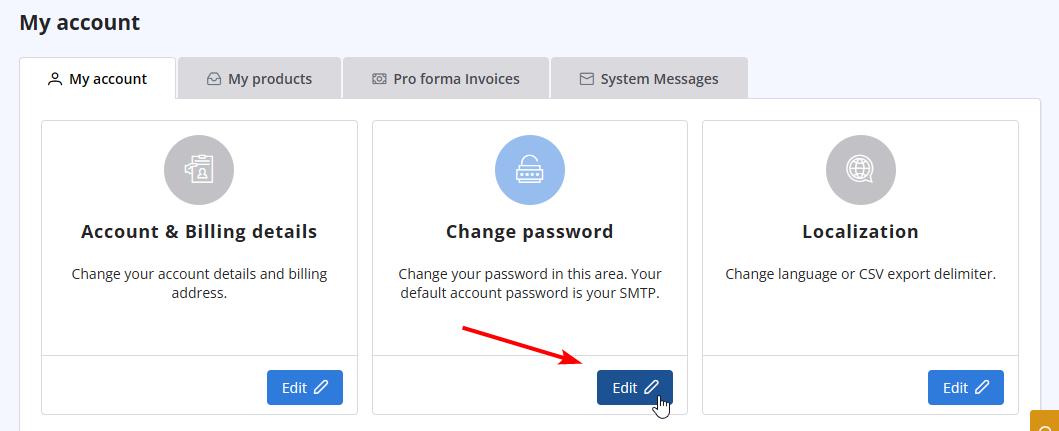
- Click on "Change Password" to update your password.
Lees ook
30. Can I use turboSMTP with Outlook or Thunderbird and send a mass email via CC/BCC? (Bekeken: 895919)
41. Privacy Policy
(Bekeken: 1548059)
41. Privacy Policy (Bekeken: 1548059)
34. What is the difference between Smart Routing and Dedicated IP Pools?
(Bekeken: 466945)
34. What is the difference between Smart Routing and Dedicated IP Pools? (Bekeken: 466945)
26. Can I configure my DKIM, DMARC and SPF to get the highest delivery rates?
(Bekeken: 22247384)
26. Can I configure my DKIM, DMARC and SPF to get the highest delivery rates? (Bekeken: 22247384)
38. I have renewed my plan, but the email counter hasn't updated yet. Why?
(Bekeken: 1238224)
38. I have renewed my plan, but the email counter hasn't updated yet. Why? (Bekeken: 1238224)
|
|

