
Kennisbank
9. How can I change my password?
Changing your password is a quick and easy way to keep your account secure. Here's how to do it:
- Log in to your dashboard.
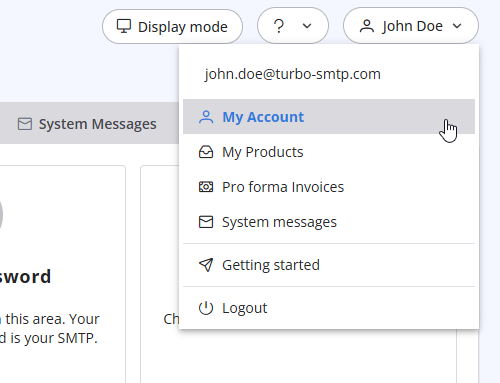
- Click on your name in the top-right corner of the screen and select "My Account" from the dropdown menu.
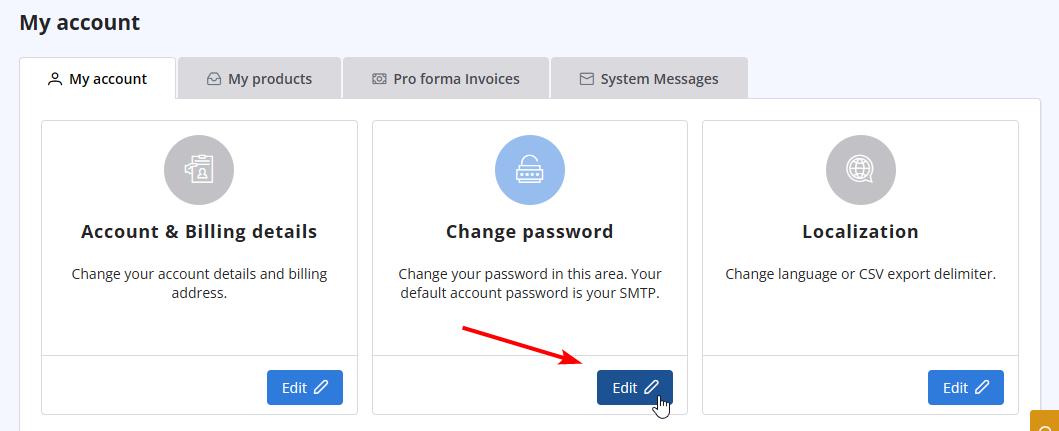
- Click on "Change Password" to update your password.
Lees ook
31. How can I get notified of my bounce?
(Bekeken: 960799)
31. How can I get notified of my bounce? (Bekeken: 960799)
18. What types of payment do you accept?
(Bekeken: 24953161)
18. What types of payment do you accept? (Bekeken: 24953161)
22. Why my emails are going to the spam folder?
(Bekeken: 1710658)
22. Why my emails are going to the spam folder? (Bekeken: 1710658)
41. Privacy Policy
(Bekeken: 1547894)
41. Privacy Policy (Bekeken: 1547894)
15. What if I want to cancel my monthly plan?
(Bekeken: 1454772)
15. What if I want to cancel my monthly plan? (Bekeken: 1454772)
|
|

