
Knowledgebase
39. How can I submit a support ticket?
To get assistance, here's how you can quickly open a support ticket from your dashboard.
- Log in to your dashboard.
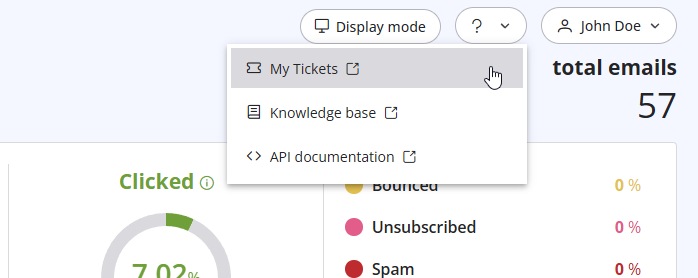
- Click the question mark (?) icon at the top of the pageand select "My Tickets" from the dropdown menu.
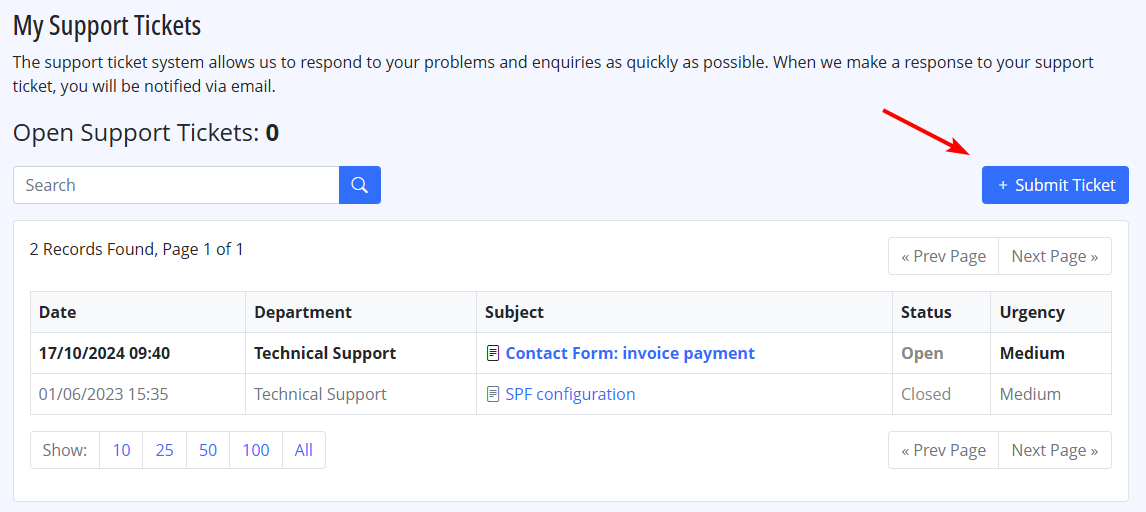
- Click on "Submit a Ticket" to create a new support request.
Also Read
10. Is the email address with which I signed up the only one that I can use as a sender? (Views: 1070654)
18. What types of payment do you accept?
(Views: 25674553)
18. What types of payment do you accept? (Views: 25674553)
29. What if the sender domain is not verified? (Re-enveloped Sender)
(Views: 1559521)
29. What if the sender domain is not verified? (Re-enveloped Sender) (Views: 1559521)
28. The string ”user = @ user.com turbo-smtp.com; On behalf of; <user@userdomain.com>”, appears in recipient's sender field . What does it mean? (Views: 1494175)
25. Can I send a PDF attached to my newsletter with turboSMTP?
(Views: 1125860)
25. Can I send a PDF attached to my newsletter with turboSMTP? (Views: 1125860)
|
|

