
Γνωσιακή Βάση
9. How can I change my password?
Changing your password is a quick and easy way to keep your account secure. Here's how to do it:
- Log in to your dashboard.
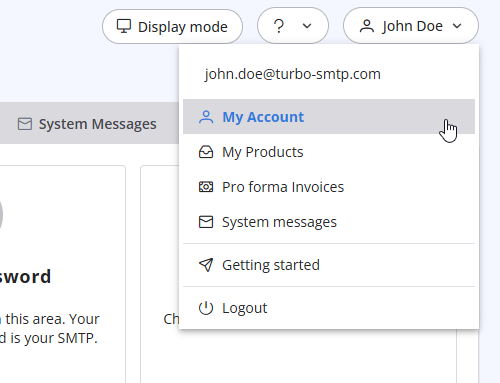
- Click on your name in the top-right corner of the screen and select "My Account" from the dropdown menu.
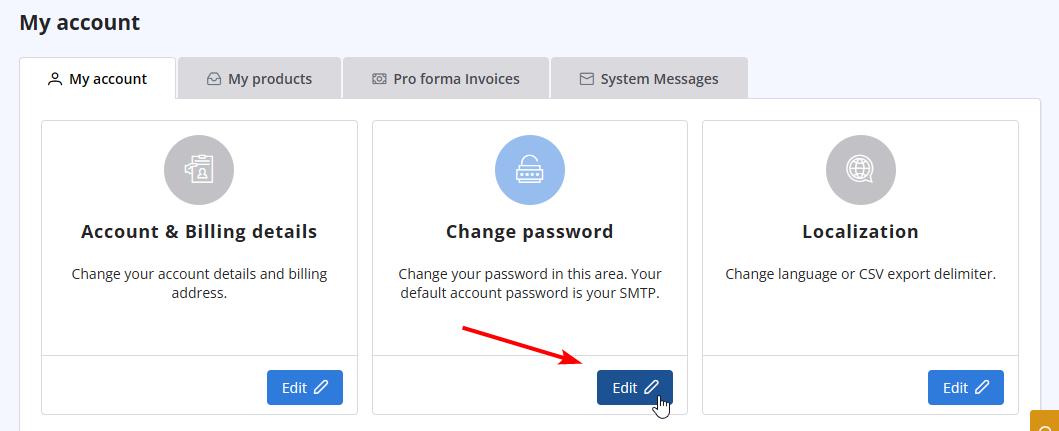
- Click on "Change Password" to update your password.
Διαβάστε Επίσης
40. Anti-Spam Policy
(Προβολές: 1387469)
40. Anti-Spam Policy (Προβολές: 1387469)
14. How can I cancel the auto-renewal of my plan?
(Προβολές: 1014107)
14. How can I cancel the auto-renewal of my plan? (Προβολές: 1014107)
12. I have more than one email address. Should I open multiple accounts?
(Προβολές: 1454099)
12. I have more than one email address. Should I open multiple accounts? (Προβολές: 1454099)
34. What is the difference between Smart Routing and Dedicated IP Pools?
(Προβολές: 466965)
34. What is the difference between Smart Routing and Dedicated IP Pools? (Προβολές: 466965)
13. I want to change my plan. Can I do it?
(Προβολές: 24359121)
13. I want to change my plan. Can I do it? (Προβολές: 24359121)
|
|

