
Γνωσιακή Βάση
9. How can I change my password?
Changing your password is a quick and easy way to keep your account secure. Here's how to do it:
- Log in to your dashboard.
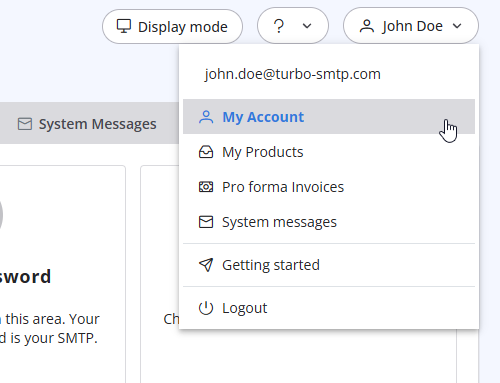
- Click on your name in the top-right corner of the screen and select "My Account" from the dropdown menu.
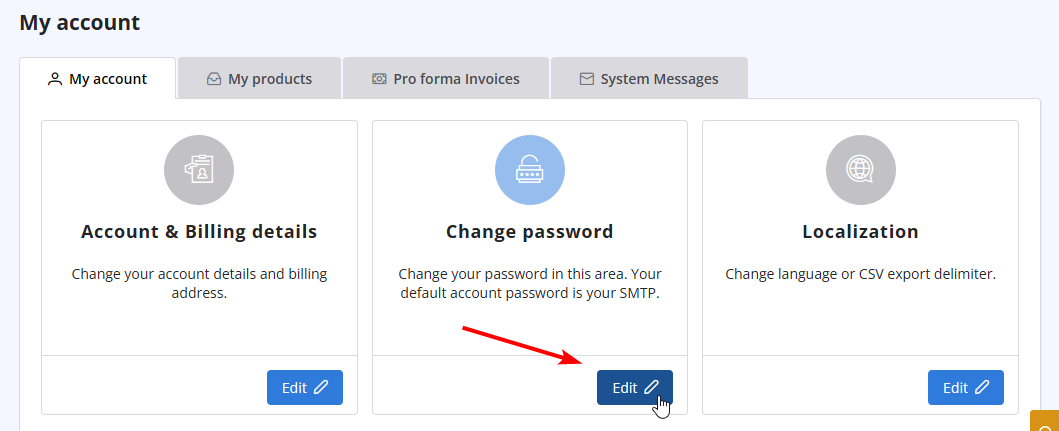
- Click on "Change Password" to update your password.
Διαβάστε Επίσης
28. The string ”user = @ user.com turbo-smtp.com; On behalf of; <user@userdomain.com>”, appears in recipient's sender field . What does it mean? (Προβολές: 1485724)
14. How can I cancel the auto-renewal of my plan?
(Προβολές: 1105967)
14. How can I cancel the auto-renewal of my plan? (Προβολές: 1105967)
36. Why is turboSMTP still using the free emails even if I bought a paid plan?
(Προβολές: 1148090)
36. Why is turboSMTP still using the free emails even if I bought a paid plan? (Προβολές: 1148090)
10. Is the email address with which I signed up the only one that I can use as a sender? (Προβολές: 1064246)
24. How can I ask the permission to send a newsletter?
(Προβολές: 1074988)
24. How can I ask the permission to send a newsletter? (Προβολές: 1074988)
|
|

