
Γνωσιακή Βάση
9. How can I change my password?
Changing your password is a quick and easy way to keep your account secure. Here's how to do it:
- Log in to your dashboard.
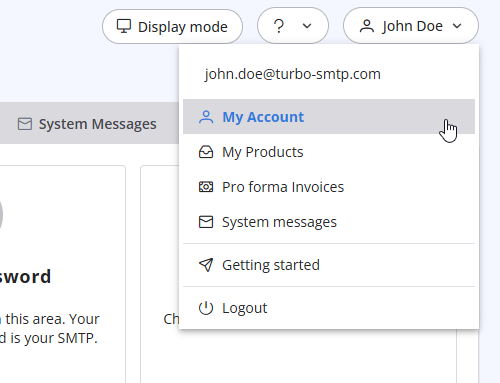
- Click on your name in the top-right corner of the screen and select "My Account" from the dropdown menu.
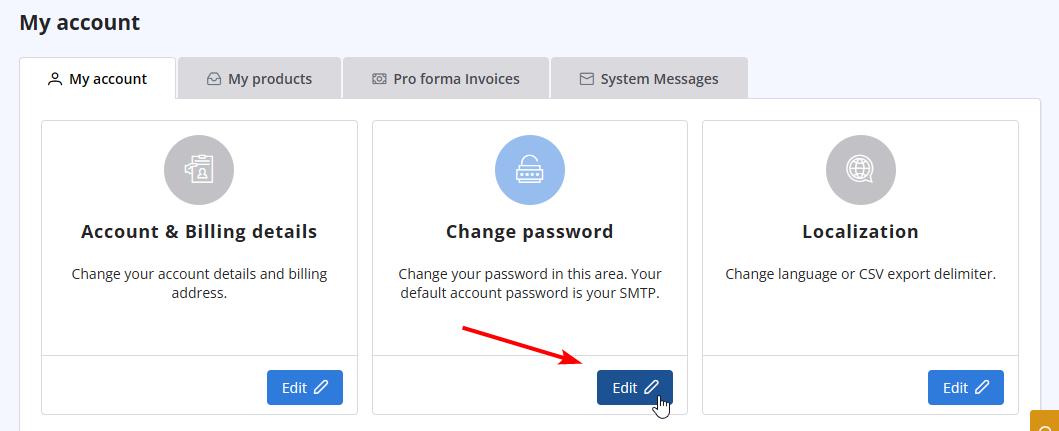
- Click on "Change Password" to update your password.
Διαβάστε Επίσης
32. Yahoo emails in queue with high complain rate error
(Προβολές: 675824)
32. Yahoo emails in queue with high complain rate error (Προβολές: 675824)
31. How can I get notified of my bounce?
(Προβολές: 898123)
31. How can I get notified of my bounce? (Προβολές: 898123)
1. What is turboSMTP?
(Προβολές: 1479880)
1. What is turboSMTP? (Προβολές: 1479880)
26. Can I configure my DKIM, DMARC and SPF to get the highest delivery rates?
(Προβολές: 22126200)
26. Can I configure my DKIM, DMARC and SPF to get the highest delivery rates? (Προβολές: 22126200)
28. The string ”user = @ user.com turbo-smtp.com; On behalf of; <user@userdomain.com>”, appears in recipient's sender field . What does it mean? (Προβολές: 1330776)
|
|

