
база знания
13. I want to change my plan. Can I do it?
You can order a new plan by following the steps below:
1. Log in to your dashboard.
2. Click on your name in the top right corner of the screen and select "My Products" from the dropdown menu.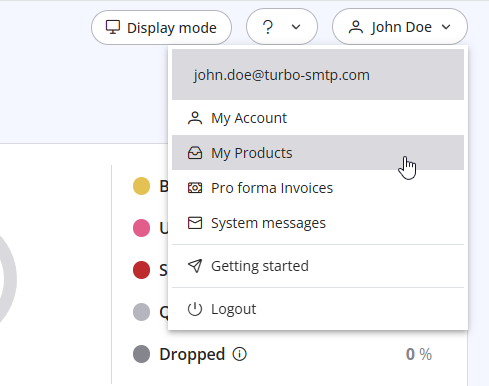
3. Click "Order New Plan" to proceed. 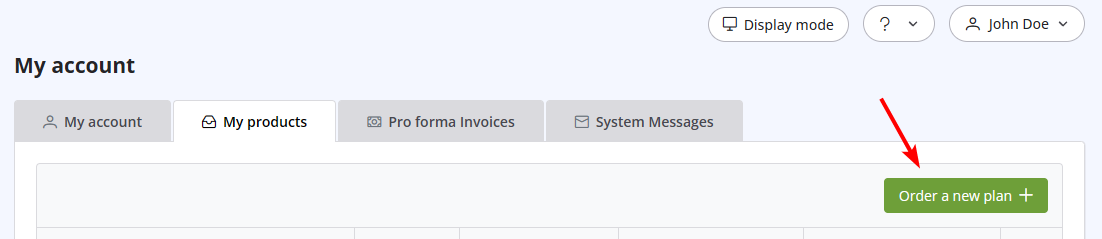
Също Прочетено
41. Privacy Policy
(Прегледи: 1542889)
41. Privacy Policy (Прегледи: 1542889)
5. Do I need a Credit Card to activate a Free Trial?
(Прегледи: 1017910)
5. Do I need a Credit Card to activate a Free Trial? (Прегледи: 1017910)
39. How can I submit a support ticket?
(Прегледи: 1112739)
39. How can I submit a support ticket? (Прегледи: 1112739)
26. Can I configure my DKIM, DMARC and SPF to get the highest delivery rates?
(Прегледи: 22215812)
26. Can I configure my DKIM, DMARC and SPF to get the highest delivery rates? (Прегледи: 22215812)
25. Can I send a PDF attached to my newsletter with turboSMTP?
(Прегледи: 1015416)
25. Can I send a PDF attached to my newsletter with turboSMTP? (Прегледи: 1015416)
|
|

