
база знания
13. I want to change my plan. Can I do it?
You can order a new plan by following the steps below:
1. Log in to your dashboard.
2. Click on your name in the top right corner of the screen and select "My Products" from the dropdown menu.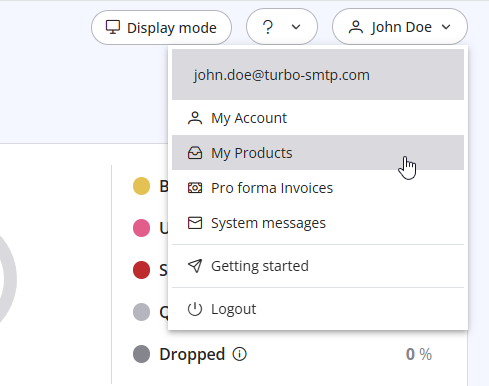
3. Click "Order New Plan" to proceed. 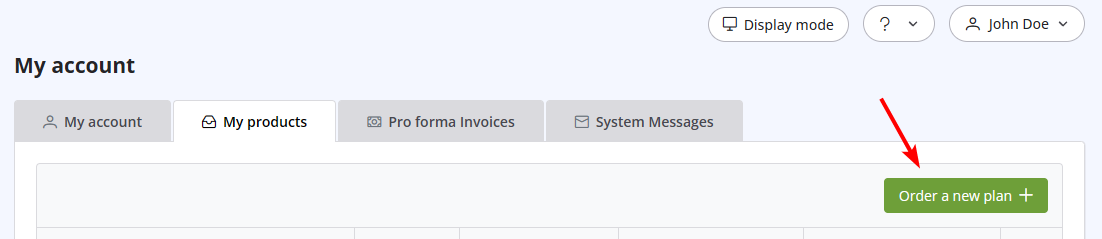
Също Прочетено
22. Why my emails are going to the spam folder?
(Прегледи: 1697220)
22. Why my emails are going to the spam folder? (Прегледи: 1697220)
32. Yahoo emails in queue with high complain rate error
(Прегледи: 723922)
32. Yahoo emails in queue with high complain rate error (Прегледи: 723922)
2. Which email clients are compatible with turboSMTP?
(Прегледи: 1317085)
2. Which email clients are compatible with turboSMTP? (Прегледи: 1317085)
6. Is the Free Trial automatically activated to all new accounts?
(Прегледи: 1024978)
6. Is the Free Trial automatically activated to all new accounts? (Прегледи: 1024978)
17. How do I keep track of sent emails?
(Прегледи: 1592455)
17. How do I keep track of sent emails? (Прегледи: 1592455)
|
|

